Puro-2B: How Can a Poor Lab Pretrain a Model from Scratch?
Matching Qwen2-1.5B on RTX 5090 GPUs—with a $5,090 budget
What would it cost for a lab on a budget to scale up from small-model experiments to pretraining billion-parameter models on trillions of tokens?
Models in this size range are widely used, from Qwen2-1.5B and Qwen2.5-1.5B to Qwen3-1.7B. Qwen releases the weights, but not the full pretraining recipe. OLMo and SmolLM also release data and training details, yet reproducing them remains expensive: the estimated compute costs for OLMoE-1B/7B and SmolLM3-3B are about $200,000 and $719,000, respectively—even at this relatively modest scale. 1, 2
For a lab on a budget, knowing how to train a model is not enough—you also need to be able to afford it. We need a low-cost, reproducible pretraining recipe.
Puro-2B: A Fully Open Recipe for Pretraining on a Budget
To make this possible, we built Puro-2B and opened up the full training pipeline: training data, framework, configurations, and model weights.
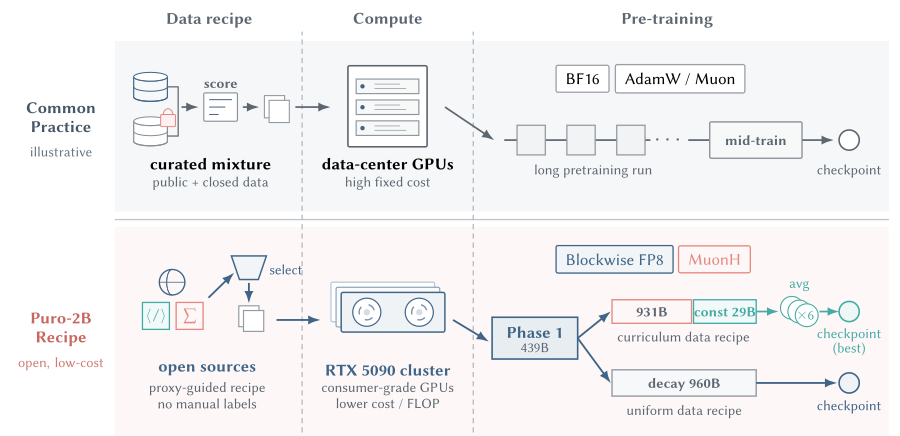
We trained a roughly two-billion-parameter model from scratch on a cluster of consumer RTX 5090 GPUs, testing several training budgets and using up to 1.4 trillion tokens. With our recipe, $4,400 in pretraining compute is enough to match Qwen2-1.5B on the average score across 15 tasks. (The $5,090 in the headline is a nod to the GPU’s name—we actually spent less.) A run with the more complete recipe costs about $6,900 and comes close to Qwen2.5-1.5B on the same 15-task average. Compared with other open recipes, Puro-2B substantially lowers the cost of pretraining.
Paper: arXiv:2608.27370
Open-source repository: Puro-Megatron
Models and datasets: Puro-2B on Hugging Face
↔ Scroll horizontally to see all 15 models
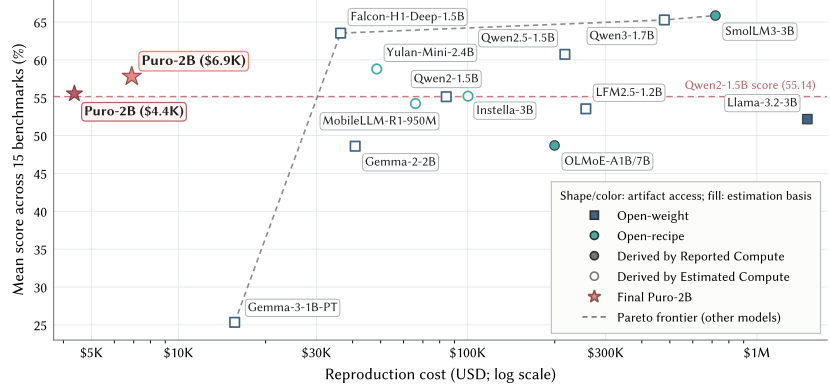
Full cost comparison (Table 7)
| Model | Release type | Estimation / measurement method | Pricing basis | GPU-hours | CNY | USD | AVG (%) |
|---|---|---|---|---|---|---|---|
| Qwen2-1.5B | Open weights | 6ND, model tokens | H100 equivalent | 25,939 | ¥573,817 | $84,302 | 55.14 |
| Qwen2.5-1.5B | Open weights | 6ND, family tokens | H100 equivalent | 66,700 | ¥1,475,530 | $216,776 | 60.73 |
| Qwen3-1.7B-Base | Open weights | 6ND, model tokens | H100 equivalent | 147,261 | ¥3,257,664 | $478,597 | 65.27 |
| Gemma-2-2B | Open weights | 6ND, model tokens | H100 equivalent | 12,560 | ¥277,860 | $40,821 | 48.60 |
| Gemma-3-1B-PT | Open weights | 6ND, model tokens | H100 equivalent | 4,812 | ¥106,460 | $15,640 | 25.34 |
| Llama-3.2-3B | Open weights | Reported GPU-hours | H100 | 460,000 | ¥10,176,017 | $1,495,000 | 52.17 |
| LFM2.5-1.2B-Base | Open weights | 6ND, family tokens | H100 equivalent | 78,828 | ¥1,743,808 | $256,190 | 53.54 |
| Falcon-H1-Deep-1.5B-Base | Open weights | 6ND, family tokens | H100 equivalent | 11,189 | ¥247,519 | $36,364 | 63.53 |
| Instella-3B | Fully open (model + data) | 6ND, model tokens | H100 equivalent | 30,851 | ¥682,470 | $100,265 | 55.20 |
| OLMoE-1B-7B-0125 | Fully open (model + data) | Reported count/time | H100 | 61,440 | ¥1,359,162 | $199,680 | 48.70 |
| Yulan-Mini-2.4B | Fully open (model + data) | 6ND, using the reported MFU | A100 80GB equivalent estimate | 27,073 | ¥329,857 | $48,461 | 58.80 |
| SmolLM3-3B-Base | Fully open (model + data) | Reported count/time | H100 | 221,184 | ¥4,892,983 | $718,848 | 65.85 |
| MobileLLM-R1-950M-base | Fully open (model + data) | Reported count/time | A100 80GB equivalent estimate | 36,864 | ¥449,151 | $65,987 | 54.23 |
| Puro-2B | Puro training results | Measured GPU-hours | RTX 5090 | 22,514 | ¥46,905 | $6,891 | 57.81 |
The figures above cover only GPU compute for main pretraining runs, not total project costs.
Browse model details and scores
Qwen2-1.5B55.14%
- Release type
- Open weights
- Original source
- Technical report / official model documentation ↗
- GPU-hours
- 25,939
- Cost in USD
- $84,302
- Estimated cost in CNY
- ¥573,817
- Average performance
- 55.14%
- Estimation / measurement method
- C = 6ND, using the model-specific training-token count.
N = 1.54B, D = 7T (model-specific tokens). - Pricing basis
- H100: $3.25/GPU-hour (CNY 22.121775/GPU-hour). Equivalent estimate: BF16 989.5 TFLOP/s, MFU = 70%.
| Benchmark | Score (%) |
|---|---|
| GSM8K | 59.82 |
| MATH | 23.70 |
| sanitized-MBPP | 50.19 |
| HumanEval | 27.44 |
| MMLU | 56.39 |
| MMLU-Pro | 23.62 |
| ARC-Challenge | 69.83 |
| ARC-Easy | 83.77 |
| BoolQ | 71.90 |
| CommonsenseQA | 70.52 |
| HellaSwag | 59.91 |
| PIQA | 75.19 |
| SocialIQA | 63.36 |
| WinoGrande | 59.67 |
| BBH | 31.73 |
| AVG | 55.14 |
Qwen2.5-1.5B60.73%
- Release type
- Open weights
- Original source
- Technical report / official model documentation ↗
- GPU-hours
- 66,700
- Cost in USD
- $216,776
- Estimated cost in CNY
- ¥1,475,530
- Average performance
- 60.73%
- Estimation / measurement method
- C = 6ND, using the number of training tokens reported for the model family.
N = 1.54B, D = 18T (training tokens used by the model family). - Pricing basis
- H100: $3.25/GPU-hour (CNY 22.121775/GPU-hour). Equivalent estimate: BF16 989.5 TFLOP/s, MFU = 70%.
| Benchmark | Score (%) |
|---|---|
| GSM8K | 67.70 |
| MATH | 32.28 |
| sanitized-MBPP | 58.37 |
| HumanEval | 31.71 |
| MMLU | 61.56 |
| MMLU-Pro | 30.43 |
| ARC-Challenge | 79.32 |
| ARC-Easy | 90.48 |
| BoolQ | 76.39 |
| CommonsenseQA | 75.10 |
| HellaSwag | 64.18 |
| PIQA | 76.17 |
| SocialIQA | 64.94 |
| WinoGrande | 59.67 |
| BBH | 42.64 |
| AVG | 60.73 |
Qwen3-1.7B-Base65.27%
- Release type
- Open weights
- Original source
- Technical report / official model documentation ↗
- GPU-hours
- 147,261
- Cost in USD
- $478,597
- Estimated cost in CNY
- ¥3,257,664
- Average performance
- 65.27%
- Estimation / measurement method
- C = 6ND, using the model-specific training-token count.
N = 1.70B, D = 36T, counting pretraining only. - Pricing basis
- H100: $3.25/GPU-hour (CNY 22.121775/GPU-hour). Equivalent estimate: BF16 989.5 TFLOP/s, MFU = 70%.
| Benchmark | Score (%) |
|---|---|
| GSM8K | 76.04 |
| MATH | 42.44 |
| sanitized-MBPP | 64.20 |
| HumanEval | 51.22 |
| MMLU | 65.47 |
| MMLU-Pro | 37.60 |
| ARC-Challenge | 80.34 |
| ARC-Easy | 91.89 |
| BoolQ | 79.63 |
| CommonsenseQA | 74.69 |
| HellaSwag | 60.47 |
| PIQA | 76.06 |
| SocialIQA | 68.68 |
| WinoGrande | 59.19 |
| BBH | 51.18 |
| AVG | 65.27 |
Gemma-2-2B48.60%
- Release type
- Open weights
- Original source
- Technical report / official model documentation ↗
- GPU-hours
- 12,560
- Cost in USD
- $40,821
- Estimated cost in CNY
- ¥277,860
- Average performance
- 48.60%
- Estimation / measurement method
- C = 6ND, using the model-specific training-token count.
N = 2.61B, D = 2T. - Pricing basis
- H100: $3.25/GPU-hour (CNY 22.121775/GPU-hour). Equivalent estimate: BF16 989.5 TFLOP/s, MFU = 70%.
| Benchmark | Score (%) |
|---|---|
| GSM8K | 33.81 |
| MATH | 14.84 |
| sanitized-MBPP | 38.52 |
| HumanEval | 20.12 |
| MMLU | 55.22 |
| MMLU-Pro | 24.40 |
| ARC-Challenge | 66.44 |
| ARC-Easy | 82.54 |
| BoolQ | 71.83 |
| CommonsenseQA | 66.18 |
| HellaSwag | 35.22 |
| PIQA | 66.10 |
| SocialIQA | 65.86 |
| WinoGrande | 52.01 |
| BBH | 35.88 |
| AVG | 48.60 |
Gemma-3-1B-PT25.34%
- Release type
- Open weights
- Original source
- Technical report / official model documentation ↗
- GPU-hours
- 4,812
- Cost in USD
- $15,640
- Estimated cost in CNY
- ¥106,460
- Average performance
- 25.34%
- Estimation / measurement method
- C = 6ND, using the model-specific training-token count.
N = 1.00B, D = 2T. - Pricing basis
- H100: $3.25/GPU-hour (CNY 22.121775/GPU-hour). Equivalent estimate: BF16 989.5 TFLOP/s, MFU = 70%.
| Benchmark | Score (%) |
|---|---|
| GSM8K | 2.58 |
| MATH | 0.94 |
| sanitized-MBPP | 9.34 |
| HumanEval | 8.54 |
| MMLU | 26.17 |
| MMLU-Pro | 11.77 |
| ARC-Challenge | 26.78 |
| ARC-Easy | 26.46 |
| BoolQ | 62.91 |
| CommonsenseQA | 20.56 |
| HellaSwag | 25.65 |
| PIQA | 49.40 |
| SocialIQA | 32.55 |
| WinoGrande | 49.57 |
| BBH | 26.89 |
| AVG | 25.34 |
Llama-3.2-3B52.17%
- Release type
- Open weights
- Original source
- Technical report / official model documentation ↗
- GPU-hours
- 460,000
- Cost in USD
- $1,495,000
- Estimated cost in CNY
- ¥10,176,017
- Average performance
- 52.17%
- Estimation / measurement method
- GPU-hours reported directly by the source, priced using Table 6.
The report lists 460,000 H100 GPU-hours. This excludes the separately reported cost of generating logits shared across the model family. - Pricing basis
- H100: $3.25/GPU-hour (CNY 22.121775/GPU-hour).
| Benchmark | Score (%) |
|---|---|
| GSM8K | 28.20 |
| MATH | 8.14 |
| sanitized-MBPP | 50.19 |
| HumanEval | 31.10 |
| MMLU | 57.55 |
| MMLU-Pro | 27.71 |
| ARC-Challenge | 72.88 |
| ARC-Easy | 84.83 |
| BoolQ | 76.02 |
| CommonsenseQA | 66.91 |
| HellaSwag | 48.12 |
| PIQA | 76.06 |
| SocialIQA | 64.28 |
| WinoGrande | 52.57 |
| BBH | 38.01 |
| AVG | 52.17 |
LFM2.5-1.2B-Base53.54%
- Release type
- Open weights
- Original source
- Technical report / official model documentation ↗
- GPU-hours
- 78,828
- Cost in USD
- $256,190
- Estimated cost in CNY
- ¥1,743,808
- Average performance
- 53.54%
- Estimation / measurement method
- C = 6ND, using the number of training tokens reported for the model family.
N = 1.17B, D = 28T (training tokens used by the model family). - Pricing basis
- H100: $3.25/GPU-hour (CNY 22.121775/GPU-hour). Equivalent estimate: BF16 989.5 TFLOP/s, MFU = 70%.
| Benchmark | Score (%) |
|---|---|
| GSM8K | 53.22 |
| MATH | 28.00 |
| sanitized-MBPP | 38.13 |
| HumanEval | 25.61 |
| MMLU | 57.50 |
| MMLU-Pro | 17.74 |
| ARC-Challenge | 82.03 |
| ARC-Easy | 87.83 |
| BoolQ | 74.40 |
| CommonsenseQA | 59.13 |
| HellaSwag | 54.20 |
| PIQA | 74.97 |
| SocialIQA | 59.26 |
| WinoGrande | 57.54 |
| BBH | 33.54 |
| AVG | 53.54 |
Falcon-H1-Deep-1.5B-Base63.53%
- Release type
- Open weights
- Original source
- Technical report / official model documentation ↗
- GPU-hours
- 11,189
- Cost in USD
- $36,364
- Estimated cost in CNY
- ¥247,519
- Average performance
- 63.53%
- Estimation / measurement method
- C = 6ND, using the number of training tokens reported for the model family.
N = 1.55B, D = 3T (tokens used by the model family). The report states that training used an H100 cluster. - Pricing basis
- H100: $3.25/GPU-hour (CNY 22.121775/GPU-hour). Equivalent estimate: BF16 989.5 TFLOP/s, MFU = 70%.
| Benchmark | Score (%) |
|---|---|
| GSM8K | 53.53 |
| MATH | 41.28 |
| sanitized-MBPP | 63.04 |
| HumanEval | 32.93 |
| MMLU | 68.74 |
| MMLU-Pro | 42.99 |
| ARC-Challenge | 85.08 |
| ARC-Easy | 93.12 |
| BoolQ | 85.23 |
| CommonsenseQA | 72.40 |
| HellaSwag | 65.24 |
| PIQA | 76.61 |
| SocialIQA | 70.83 |
| WinoGrande | 60.14 |
| BBH | 41.86 |
| AVG | 63.53 |
Instella-3B55.20%
- Release type
- Fully open (model + data)
- Original source
- Technical report / official model documentation ↗
- GPU-hours
- 30,851
- Cost in USD
- $100,265
- Estimated cost in CNY
- ¥682,470
- Average performance
- 55.20%
- Estimation / measurement method
- C = 6ND, using the model-specific training-token count.
N = 3.11B, D = 4.122575T (4.065T + 57.575B). - Pricing basis
- H100: $3.25/GPU-hour (CNY 22.121775/GPU-hour). Equivalent estimate: BF16 989.5 TFLOP/s, MFU = 70%.
| Benchmark | Score (%) |
|---|---|
| GSM8K | 64.44 |
| MATH | 13.30 |
| sanitized-MBPP | 41.25 |
| HumanEval | 14.63 |
| MMLU | 58.55 |
| MMLU-Pro | 25.32 |
| ARC-Challenge | 74.92 |
| ARC-Easy | 87.30 |
| BoolQ | 76.76 |
| CommonsenseQA | 75.43 |
| HellaSwag | 59.92 |
| PIQA | 73.23 |
| SocialIQA | 69.91 |
| WinoGrande | 53.99 |
| BBH | 39.11 |
| AVG | 55.20 |
OLMoE-1B-7B-012548.70%
- Release type
- Fully open (model + data)
- Original source
- Technical report / official model documentation ↗
- GPU-hours
- 61,440
- Cost in USD
- $199,680
- Estimated cost in CNY
- ¥1,359,162
- Average performance
- 48.70%
- Estimation / measurement method
- Reported GPU count and training duration. GPU-hours = GPU count × hours.
256 H100 GPUs × approximately 10 days × 24 hours = 61,440 GPU-hours. The duration is approximate. - Pricing basis
- H100: $3.25/GPU-hour (CNY 22.121775/GPU-hour).
| Benchmark | Score (%) |
|---|---|
| GSM8K | 54.59 |
| MATH | 15.48 |
| sanitized-MBPP | 33.46 |
| HumanEval | 12.80 |
| MMLU | 54.11 |
| MMLU-Pro | 19.67 |
| ARC-Challenge | 66.44 |
| ARC-Easy | 84.30 |
| BoolQ | 72.97 |
| CommonsenseQA | 62.82 |
| HellaSwag | 36.54 |
| PIQA | 71.16 |
| SocialIQA | 65.15 |
| WinoGrande | 50.28 |
| BBH | 30.74 |
| AVG | 48.70 |
Yulan-Mini-2.4B58.80%
- Release type
- Fully open (model + data)
- Original source
- Technical report / official model documentation ↗
- GPU-hours
- 27,073
- Cost in USD
- $48,461
- Estimated cost in CNY
- ¥329,857
- Average performance
- 58.80%
- Estimation / measurement method
- C = 6ND with the reported 51.57% MFU and A800 BF16 peak of 312 TFLOP/s.
N = 2.42B, D = 1.08T. GPU-hours are derived using the reported MFU. A800 costs are estimated at the A100 80GB rate. - Pricing basis
- Costed at the A100 80GB rate: $1.79/GPU-hour (about CNY 12.184/GPU-hour).
| Benchmark | Score (%) |
|---|---|
| GSM8K | 68.99 |
| MATH | 27.18 |
| sanitized-MBPP | 62.26 |
| HumanEval | 50.00 |
| MMLU | 51.74 |
| MMLU-Pro | 23.68 |
| ARC-Challenge | 65.08 |
| ARC-Easy | 82.54 |
| BoolQ | 78.47 |
| CommonsenseQA | 66.18 |
| HellaSwag | 59.92 |
| PIQA | 76.22 |
| SocialIQA | 63.31 |
| WinoGrande | 62.35 |
| BBH | 44.12 |
| AVG | 58.80 |
SmolLM3-3B-Base65.85%
- Release type
- Fully open (model + data)
- Original source
- Technical report / official model documentation ↗
- GPU-hours
- 221,184
- Cost in USD
- $718,848
- Estimated cost in CNY
- ¥4,892,983
- Average performance
- 65.85%
- Estimation / measurement method
- Reported GPU count and training duration. GPU-hours = GPU count × hours.
384 H100 GPUs × 24 days × 24 hours = 221,184 GPU-hours. - Pricing basis
- H100: $3.25/GPU-hour (CNY 22.121775/GPU-hour).
| Benchmark | Score (%) |
|---|---|
| GSM8K | 81.73 |
| MATH | 56.12 |
| sanitized-MBPP | 60.31 |
| HumanEval | 37.80 |
| MMLU | 62.24 |
| MMLU-Pro | 39.02 |
| ARC-Challenge | 79.32 |
| ARC-Easy | 89.95 |
| BoolQ | 84.80 |
| CommonsenseQA | 72.73 |
| HellaSwag | 70.23 |
| PIQA | 81.12 |
| SocialIQA | 70.62 |
| WinoGrande | 64.25 |
| BBH | 37.52 |
| AVG | 65.85 |
MobileLLM-R1-950M-base54.23%
- Release type
- Fully open (model + data)
- Original source
- Technical report / official model documentation ↗
- GPU-hours
- 36,864
- Cost in USD
- $65,987
- Estimated cost in CNY
- ¥449,151
- Average performance
- 54.23%
- Estimation / measurement method
- Reported GPU count and training duration. GPU-hours = GPU count × hours.
The official training table lists 128 GPUs, two pretraining stages of 4–5 days each, and two mid-training stages of 1–2 days each: 30,720–43,008 GPU-hours. We use the midpoint, 36,864 GPU-hours. The table does not name the GPU model. Costs use the A100 80GB rate. - Pricing basis
- Costed at the A100 80GB rate: $1.79/GPU-hour (about CNY 12.184/GPU-hour).
| Benchmark | Score (%) |
|---|---|
| GSM8K | 68.31 |
| MATH | 27.24 |
| sanitized-MBPP | 50.58 |
| HumanEval | 43.29 |
| MMLU | 48.24 |
| MMLU-Pro | 21.95 |
| ARC-Challenge | 58.31 |
| ARC-Easy | 78.13 |
| BoolQ | 78.87 |
| CommonsenseQA | 61.59 |
| HellaSwag | 54.16 |
| PIQA | 73.50 |
| SocialIQA | 59.77 |
| WinoGrande | 55.33 |
| BBH | 34.15 |
| AVG | 54.23 |
Puro-2B57.81%
- Release type
- Puro training results
- Original source
- Technical report / official model documentation ↗
- GPU-hours
- 22,514
- Cost in USD
- $6,891
- Estimated cost in CNY
- ¥46,905
- Average performance
- 57.81%
- Estimation / measurement method
- GPU-hours are calculated from the actual training time and the number of GPUs used.
Phase 1: 6,009.46 GPU-hours. Phase 2: 16,504.95 GPU-hours. Total: 22,514.41 GPU-hours, excluding queueing, downtime, and other time not spent training. - Pricing basis
- RTX 5090: CNY 12,000 per 8-GPU node-month ÷ (8 × 30 × 24) = CNY 2.0833/GPU-hour, about $0.3061/GPU-hour.
| Benchmark | Score (%) |
|---|---|
| GSM8K | 59.67 |
| MATH | 30.30 |
| sanitized-MBPP | 52.92 |
| HumanEval | 31.10 |
| MMLU | 57.44 |
| MMLU-Pro | 25.81 |
| ARC-Challenge | 74.24 |
| ARC-Easy | 86.07 |
| BoolQ | 76.85 |
| CommonsenseQA | 67.81 |
| HellaSwag | 63.21 |
| PIQA | 75.52 |
| SocialIQA | 63.61 |
| WinoGrande | 60.62 |
| BBH | 42.05 |
| AVG | 57.81 |
Puro-2B (UD; $4.4K)55.54%
- Release type
- Puro training results
- Original source
- Technical report / official model documentation ↗
- GPU-hours
- 14,262
- Cost in USD
- $4,365
- Estimated cost in CNY
- ¥29,712
- Average performance
- 55.54%
- Estimation / measurement method
- GPU-hours are calculated from the actual training time and the number of GPUs used.
This run uses 24 GPUs in Phase 1 and 96 in Phase 2, totaling about 14,262 GPU-hours and $4,365, shown as $4.4K in the plot. The average score is 55.54%. - Pricing basis
- RTX 5090: CNY 12,000 per 8-GPU node-month ÷ (8 × 30 × 24) = CNY 2.0833/GPU-hour, about $0.3061/GPU-hour.
| Benchmark | Score (%) |
|---|---|
| GSM8K | 56.03 |
| MATH | 27.86 |
| sanitized-MBPP | 49.81 |
| HumanEval | 20.73 |
| MMLU | 54.82 |
| MMLU-Pro | 24.02 |
| ARC-Challenge | 66.78 |
| ARC-Easy | 84.66 |
| BoolQ | 77.34 |
| CommonsenseQA | 67.65 |
| HellaSwag | 63.62 |
| PIQA | 75.84 |
| SocialIQA | 62.90 |
| WinoGrande | 59.91 |
| BBH | 41.14 |
| AVG | 55.54 |
This run uses randomly shuffled data (UD). For results at different training budgets, see Figure 3 · Paper tables ↗
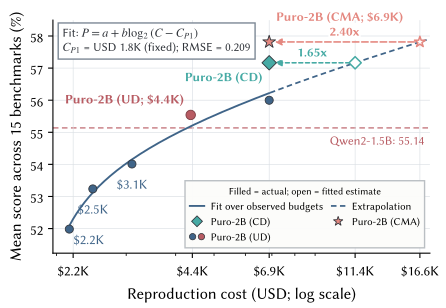
What if your budget is smaller still? We fit an empirical cost–performance curve—the Puro Cost Scaling Law—to estimate how far different budgets can go. Starting from the same Phase 1 checkpoint, we run Phase 2 with randomly shuffled data (Uniform Data, or UD) at several training budgets, then fit average evaluation score against total cost. This curve is specific to the Puro recipe. Researchers can use it to estimate achievable performance and adapt the recipe to their needs before committing to a full run, without first repeating our longest training run.
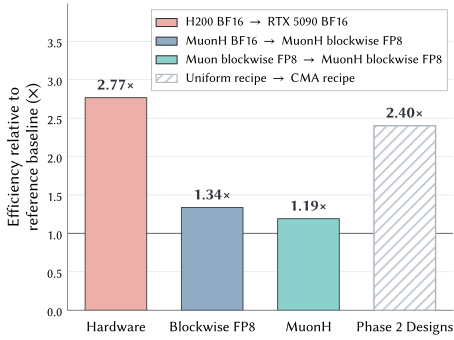
The savings come from designing five parts of the training pipeline to work together: hardware choice, low-precision training, optimizer improvements, effective use of high-quality data, and data selection.
↔ Scroll horizontally to see the full chart
RTX 5090: More Compute per Dollar
Let’s start with the hardware. Which GPU gives you more compute for the same budget? We compare the cost per GPU-hour using H200 rental quotes and the cost of owning an RTX 5090, amortized over five years, plus electricity. The resulting RTX 5090 rate is close to the market rental quotes available to us. On this basis, the RTX 5090 delivers about 2.77 times as much peak BF16 compute per dollar as the H200. Its peak throughput is lower, but its GPU-hour cost is lower by an even larger factor, so the same budget buys more compute. Consumer GPUs are also easier for labs on a budget to acquire.
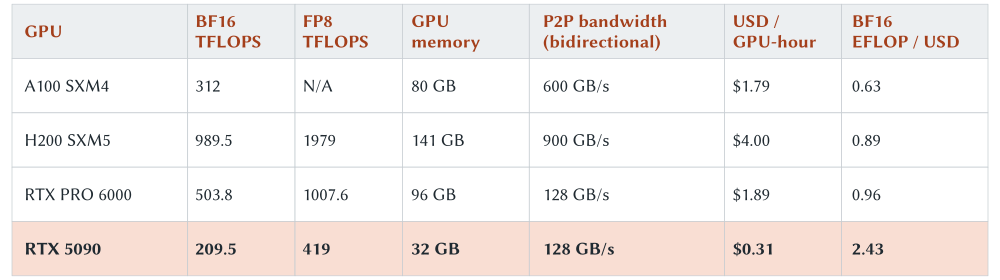
Improving GPU communication. There is a catch: the RTX 5090 has only 32 GB of memory and no NVLink, so we cannot simply reuse a training setup designed for data-center GPUs. By adjusting drivers and system settings, we enable PCIe P2P communication within each node, increasing one-way GPU-to-GPU bandwidth from 31.5 GB/s to 56 GB/s and cutting latency from 14.3 µs to 0.4 µs. Across nodes, GPUDirect RDMA raises the 24-GPU AllReduce bus bandwidth from 8.87 GB/s to 19.93 GB/s. 3, 4
Balancing compute and memory. We also tailor the training setup to billion-parameter models and the RTX 5090’s hardware constraints. We combine data parallelism with pipeline parallelism, avoiding communication-heavy tensor parallelism. We then rebalance work across pipeline stages, tune the microbatch size, and distribute optimizer states according to memory usage to balance memory load across nodes. Together, these changes bring overall model FLOPs utilization (MFU) above 70%, turning consumer GPUs’ price advantage into lower training costs.
2.77×Efficiency gains and supporting experiments
H200 BF16 → RTX 5090 BF16
Which GPU gives you more BF16 compute for the same budget? The answer depends on both its compute throughput and how long the budget lets it run. The H200 provides 989.5 TFLOP/s of peak BF16 throughput at $4 per GPU-hour. The RTX 5090 provides 209.5 TFLOP/s at about $0.3061 per GPU-hour. The RTX 5090 rate comes from our hardware and electricity costs, about CNY 12,000 per month for an eight-GPU node.
For $1, the H200 can run for 1/4 = 0.25 hours, while the RTX 5090 can run for 1/0.3061 ≈ 3.27 hours. Multiplying each runtime by its peak throughput and taking the ratio gives (209.5 ÷ 0.3061) ÷ (989.5 ÷ 4) ≈ 2.77. The RTX 5090 has lower peak throughput per GPU, but its price is lower by an even larger factor. The same budget therefore buys about 2.77 times as much peak BF16 compute.
With cheaper compute in place, the next step is to make training faster with FP8.
FP8: Faster Training on RTX 5090 GPUs
The RTX 5090’s Blackwell architecture supports FP8 training. Following DeepSeek-V3’s fine-grained blockwise quantization approach, we run the main linear-layer matrix multiplications in FP8 and keep numerically sensitive operations and training states in BF16 or FP32. See the full FP8 training scheme for an overview of these precision choices. 5
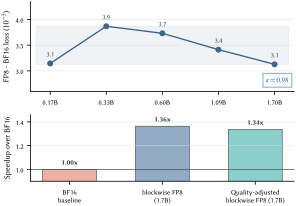
Does the speedup outweigh the loss penalty? We compare FP8 with BF16 at five model sizes in a scaling ladder. FP8’s validation loss is about 0.003–0.004 higher, with a small, relatively stable gap across scales. At 1.7B parameters, however, FP8 delivers 1.36 times the training throughput of BF16. Faster throughput is not the whole story: we also account for the extra compute FP8 needs to reach the same loss as BF16. After this quality adjustment, the estimated net efficiency gain is still about 1.34×.
1.34×Efficiency gains and supporting experiments
MuonH BF16 → MuonH blockwise FP8
FP8 runs faster but uses lower numerical precision. To estimate how much training time it saves, we consider both the number of tokens processed per second and the training compute needed to reach the same validation loss.
We first compare BF16 and blockwise FP8 at five model sizes. FP8’s validation loss is about 0.003–0.004 higher than BF16’s. Using the fitted loss–compute curves, we translate this gap into the extra compute needed to match the loss and find that FP8 still retains about 98% of the compute efficiency.
We then account for runtime throughput. On the 1.7B model, measured FP8 throughput is about 1.36 times that of BF16. Combining this throughput gain with the compute-efficiency factor gives a net gain of about 1.34 times, corresponding to an estimated 25.2% reduction in GPU-hours at the same validation loss.
MuonH: Rethinking Optimization Through Effective Learning Rates
Precision determines how we compute an update. The optimizer and learning rate (LR) determine its direction and size. We use MuonH, a variant of Muon that normalizes the update and projects the updated weights back onto a fixed-radius sphere. The effective learning rate (ELR) measures the update size relative to the weight norm. By controlling both norms, MuonH makes the LR for the matrix parameters it handles numerically equal to their ELR, measured before projection. Setting the LR schedule for these parameters therefore directly sets their ELR trajectory. 6
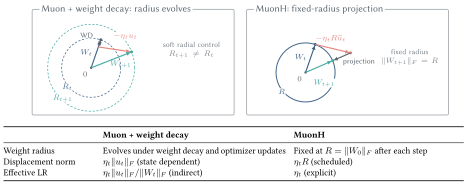
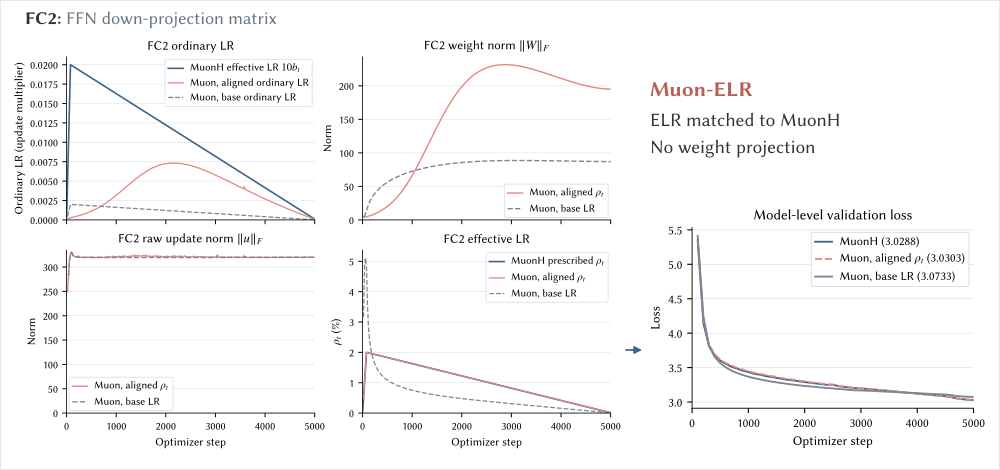
Can standard Muon reproduce MuonH’s loss curve if we match their ELRs? We test this with a 170M-parameter model trained in BF16. This control, Muon-ELR, does not project weights onto a fixed-radius sphere: their norms remain free to change. Instead, we adjust Muon’s scalar learning rate at each step so that its effective learning-rate trajectory follows MuonH’s. For the matrix parameters handled by MuonH, the ELR equals the prescribed learning rate, so we use that schedule as the target. Once the ELRs are aligned, the two loss curves nearly overlap. This suggests that, in this experiment, MuonH’s advantage is not explained by the norm constraint alone: the effective learning-rate trajectory is key to understanding why Hyperball optimization works. 6, 11
Effective LR: Weight Norms and Update Angles
170M · BF16One record every 20 steps, starting at step 20, from the same BF16 diagnostic. Sparklines for each metric share a vertical scale.
↔ Scroll horizontally for the full comparison
MuonStandard Muon
Model architecture +- Scalar LR · η
- 1.021e-3
- Weight norm · ‖W‖
- 87.89
- Update norm · ‖u‖Before LR scaling
- 319.65
- Effective LR · ρ
- 3.887e-3
MuonHFixed radius
Model architecture +- Scalar LR · η
- 1.021e-2
- Weight norm · ‖W‖
- RR = ‖W₀‖
- Update norm · ‖u‖Before LR scaling
- R‖R û‖ = R
- Effective LR · ρ
- 1.021e-2
Muon-ELRAligned ELR
Model architecture +- Scalar LR · η
- 7.020e-3
- Weight norm · ‖W‖
- 226.88
- Update norm · ‖u‖Before LR scaling
- 320.83
- Effective LR · ρ
- 1.022e-2
How to read the schematic
This schematic reduces high-dimensional parameter updates to a two-dimensional tangential update so the three configurations are easier to compare. In this simplified geometry, effective LR ρ corresponds to an angle θ = arctan ρ. We magnify all angles by 20× to make the alignment between MuonH and Muon-ELR visible. Radii are shown on a logarithmic scale. For each run, the weight norm at step 20 is normalized to 1 and shown as a dashed reference circle, so an expanding circle indicates growth relative to that run’s own starting norm.
ELR is defined using the pre-projection update. The MuonH equality applies to its matrix parameters; other groups use AdamW at the base LR.
Muon · Model architecture
Dashed boxes mark matrix parameter groups; FC2 is the tracked parameter. AdamW updates the remaining parameter groups. The diagram includes the attention and MLP residual paths.
MuonH · Model architecture
Dashed boxes mark matrix parameter groups; FC2 is the tracked parameter. AdamW updates the remaining parameter groups. The diagram includes the attention and MLP residual paths.
Muon-ELR · Model architecture
Dashed boxes mark matrix parameter groups; FC2 is the tracked parameter. AdamW updates the remaining parameter groups. The diagram includes the attention and MLP residual paths.
A closer comparison shows that when weight decay does not sufficiently constrain weight norms, standard Muon’s ELR drops more quickly early in training, and its loss falls sooner. MuonH shows a more gradual ELR decay and performs better later in training. This shifts the question from which optimizer to use to how to design its effective learning-rate schedule. 7
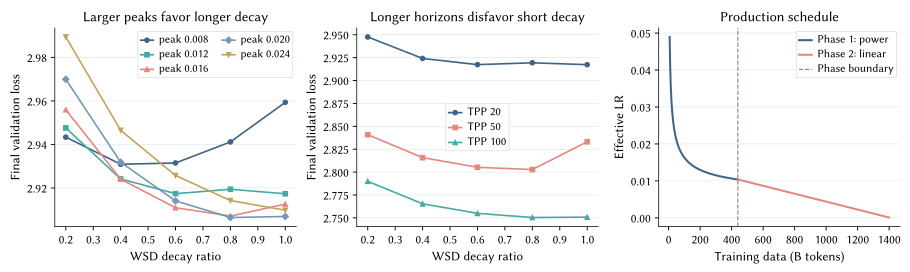
How long should the decay phase be? Using a Warmup-Stable-Decay (WSD) schedule, we vary the peak learning rate, training-token budget, and fraction of the run spent in decay. Higher peaks and longer runs generally benefit from a longer decay phase. These results motivate the long linear decay in Phase 2, giving the loss time to converge. Phase 1 uses a power schedule for a different reason: it lets training continue without a predetermined endpoint. 8
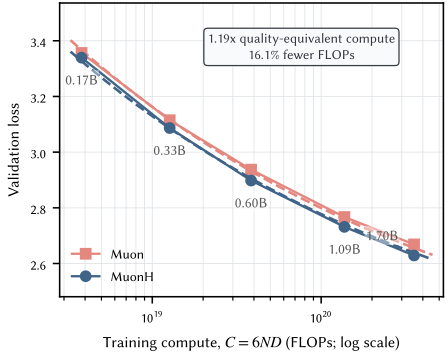
Comparing compute at matched loss. The ELR-alignment experiment asks whether standard Muon can reproduce MuonH’s loss curve. The next question is how much compute each recipe needs to reach the same validation loss. We compare five model sizes, from 0.17B to 1.7B parameters, in a scaling ladder, using blockwise FP8 for both recipes. The tuned Muon baseline here uses a learning rate chosen for each model size and decays it linearly. This is different from the Muon-ELR control above, which adjusts the scalar learning rate at every step to match MuonH’s ELR. Fitting loss–compute curves to these five pairs of runs suggests that the MuonH recipe is about 1.19 times as compute-efficient as the tuned Muon baseline.
1.19×Efficiency gains and supporting experiments
Tuned Muon → MuonH (both blockwise FP8)
How much less compute does MuonH need than Muon to reach the same validation loss? We train models at the same set of sizes with each optimizer, use blockwise FP8 in both cases, and tune the Muon baseline. We then fit a loss–compute curve to each set of results.
At a given validation loss, we read off the FLOPs required by each curve. Muon needs about 1.19 times as much compute as MuonH. In other words, if Muon needs 100 units of compute, MuonH needs about 84, saving roughly 16.1%.
CMA: Getting More from High-Quality Data Late in Training
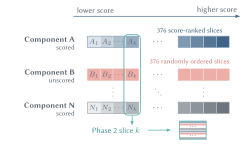
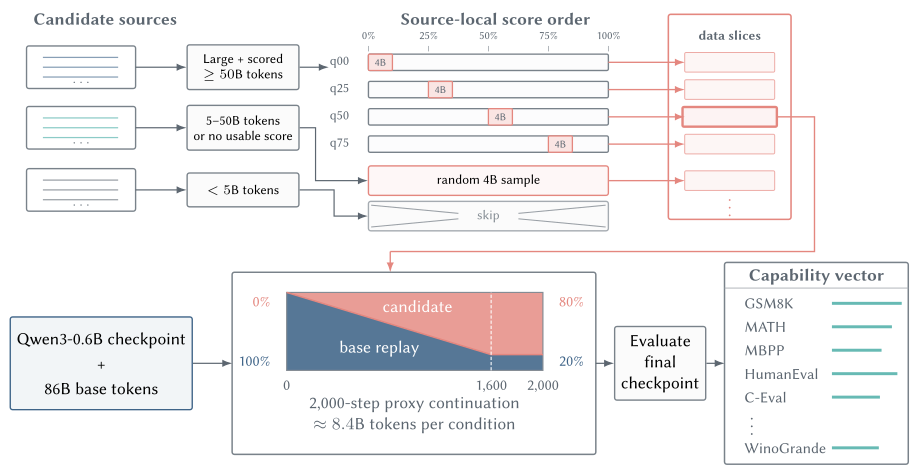
The optimizer is only part of the story. The order in which a model sees its data matters too. High-quality examples make up a small but important share of the training corpus, and placing them later can help the model make better use of them. Many open datasets include quality scores for individual samples. We use these scores to order examples from lower to higher quality within each source, then mix blocks from the same relative positions in these ordered sequences. As training progresses, the model sees higher-quality examples while the mix of sources stays roughly constant within each local training window. This avoids abrupt shifts in domain proportions as data quality changes.
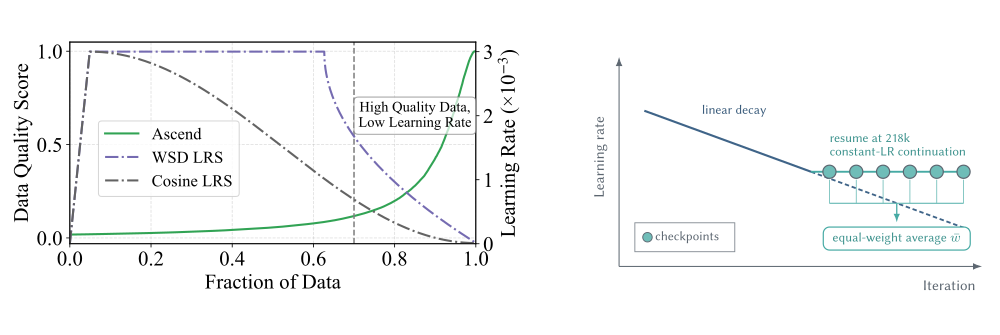
Placing high-quality data late in training also changes what we need from the learning-rate schedule. Our earlier work found that when the learning rate becomes too small late in training, even high-quality examples have little effect on the model’s parameters. We address this with Curriculum Model Averaging (CMA). We first train Phase 2 with linear learning-rate decay, then resume from the checkpoint at step 218,000. From there, we hold the learning rate at its value at that step rather than decaying it further, allowing the model to keep learning from the remaining high-quality data. Finally, we take the arithmetic mean of corresponding parameters across the last six checkpoints of this continued run. The averaged parameters become the final model, reducing the influence of fluctuations in any single checkpoint. 9
Extra-Merge is another recent advance in model merging during pretraining: it extrapolates along merged-checkpoint trajectories without additional gradient updates. 12 Our CMA recipe uses equal-weight checkpoint averaging, without extrapolation.
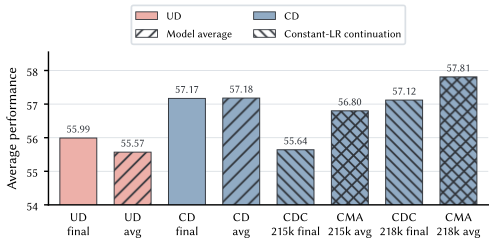
How much does data order matter? With the data pool and learning-rate decay schedule held fixed, curriculum ordering outperforms random shuffling. CD decay final scores 57.17, versus 55.99 for UD decay final. Averaging checkpoints along each decay trajectory gives 57.18 for CD decay avg and 55.57 for UD decay avg. The curriculum improves the average score by 1.18 and 1.61 percentage points in these two comparisons, showing that changing the data order alone can help. 9
Averaging along the decay trajectory brings little benefit. The UD average score falls from 55.99 to 55.57, while the CD score changes from 57.17 to 57.18. Simply averaging late checkpoints while keeping the learning-rate decay does not produce a meaningful gain.
Averaging helps after constant-LR continuation. For the run resumed at step 215,000, averaging the last six checkpoints raises the score from 55.64 for CDC 215k final to 56.80 for CMA 215k avg. For the run resumed at step 218,000, averaging raises the score from 57.12 to 57.81. These gains of 1.16 and 0.69 percentage points suggest that averaging is more effective when the model continues learning from high-quality data at a constant learning rate late in training. Our final CMA model follows this recipe: use curriculum-ordered data, resume from step 218,000 at that checkpoint’s learning rate, keep it constant, and average parameters across the last six continuation checkpoints.
↔ Scroll horizontally to see the full chart
UD: shuffled data with LR decay. CD: curriculum order with LR decay. CDC: CD followed by constant-LR continuation. CMA: parameter averaging over late continuation checkpoints. 215k/218k: resume at step 215,000/218,000. final / avg: the final checkpoint / the average of checkpoint parameters.
All configurations start from the same Phase 1 checkpoint and use the same Phase 2 data pool. Step numbers are global optimizer steps.
Figure 13 · Training configuration
UD decay final55.99%
Training setup at a glance
↔ Scroll horizontally to view the full schematic
Colors show relative sample quality within each source. Checkpoints with recorded step numbers are labeled explicitly. Other checkpoints are shown as θ₁…θₙ.
- Data order
- Uniform Data (UD): the full Phase 2 data pool is randomly shuffled before training.
- Learning rate and continuation
- Train Phase 2 to completion with linear learning-rate decay.
- Selected checkpoints
- The final checkpoint of this run.
- Model averaging
- Use the final checkpoint’s model parameters directly.
UD decay avg55.57%
Training setup at a glance
↔ Scroll horizontally to view the full schematic
Colors show relative sample quality within each source. Checkpoints with recorded step numbers are labeled explicitly. Other checkpoints are shown as θ₁…θₙ. The checkpoint inset has its own linear time axis; unpublished checkpoint positions are schematic.
- Data order
- Uniform Data (UD): the full Phase 2 data pool is randomly shuffled before training.
- Learning rate and continuation
- Train Phase 2 to completion with linear learning-rate decay.
- Selected checkpoints
- Take checkpoints saved near the end of training with learning-rate decay. The paper does not list the individual checkpoint steps for this averaged configuration.
- Model averaging
- Take the arithmetic mean of corresponding model parameters across these checkpoints (SMA), then evaluate the averaged model. Optimizer states are not averaged.
CD decay final57.17%
Training setup at a glance
↔ Scroll horizontally to view the full schematic
Colors show relative sample quality within each source. Checkpoints with recorded step numbers are labeled explicitly. Other checkpoints are shown as θ₁…θₙ.
- Data order
- Curriculum Data (CD): samples with quality scores are ordered from lower to higher quality within each source. Unscored samples keep a fixed random order. Blocks from the different sources are mixed at the same relative positions in their sequences, so higher-quality samples appear later in training.
- Learning rate and continuation
- Train Phase 2 to completion with linear learning-rate decay.
- Selected checkpoints
- The final checkpoint of this run.
- Model averaging
- Use the final checkpoint’s model parameters directly.
CD decay avg57.18%
Training setup at a glance
↔ Scroll horizontally to view the full schematic
Colors show relative sample quality within each source. Checkpoints with recorded step numbers are labeled explicitly. Other checkpoints are shown as θ₁…θₙ. The checkpoint inset has its own linear time axis; unpublished checkpoint positions are schematic.
- Data order
- Curriculum Data (CD): samples with quality scores are ordered from lower to higher quality within each source. Unscored samples keep a fixed random order. Blocks from the different sources are mixed at the same relative positions in their sequences, so higher-quality samples appear later in training.
- Learning rate and continuation
- Train Phase 2 to completion with linear learning-rate decay.
- Selected checkpoints
- Take checkpoints saved near the end of training with learning-rate decay. The paper does not list the individual checkpoint steps for this averaged configuration.
- Model averaging
- Take the arithmetic mean of corresponding model parameters across these checkpoints (SMA), then evaluate the averaged model. Optimizer states are not averaged.
CDC 215k final55.64%
Training setup at a glance
↔ Scroll horizontally to view the full schematic
Colors show relative sample quality within each source. Checkpoints with recorded step numbers are labeled explicitly. Other checkpoints are shown as θ₁…θₙ.
- Data order
- Curriculum Data (CD): samples with quality scores are ordered from lower to higher quality within each source. Unscored samples keep a fixed random order. Blocks from the different sources are mixed at the same relative positions in their sequences, so higher-quality samples appear later in training.
- Learning rate and continuation
- First train on curriculum-ordered data with linear learning-rate decay. Resume from step 215,000, continue on the remaining curriculum-ordered data, and hold the learning rate at its value at that checkpoint.
- Selected checkpoints
- The final checkpoint of this run.
- Model averaging
- Use the final checkpoint’s model parameters directly.
CMA 215k avg56.80%
Training setup at a glance
↔ Scroll horizontally to view the full schematic
Colors show relative sample quality within each source. Checkpoints with recorded step numbers are labeled explicitly. Other checkpoints are shown as θ₁…θₙ. The checkpoint inset has its own linear time axis; unpublished checkpoint positions are schematic.
- Data order
- Curriculum Data (CD): samples with quality scores are ordered from lower to higher quality within each source. Unscored samples keep a fixed random order. Blocks from the different sources are mixed at the same relative positions in their sequences, so higher-quality samples appear later in training.
- Learning rate and continuation
- First train on curriculum-ordered data with linear learning-rate decay. Resume from step 215,000, continue on the remaining curriculum-ordered data, and hold the learning rate at its value at that checkpoint.
- Selected checkpoints
- Take 6 late checkpoints from the continuation resumed at step 215,000. The paper does not list the individual checkpoint steps for this averaged configuration.
- Model averaging
- Take the arithmetic mean of corresponding model parameters across these checkpoints (SMA), then evaluate the averaged model. Optimizer states are not averaged.
CDC 218k final57.12%
Training setup at a glance
↔ Scroll horizontally to view the full schematic
Colors show relative sample quality within each source. Checkpoints with recorded step numbers are labeled explicitly. Other checkpoints are shown as θ₁…θₙ.
- Data order
- Curriculum Data (CD): samples with quality scores are ordered from lower to higher quality within each source. Unscored samples keep a fixed random order. Blocks from the different sources are mixed at the same relative positions in their sequences, so higher-quality samples appear later in training.
- Learning rate and continuation
- First train on curriculum-ordered data with linear learning-rate decay. Resume from step 218,000, continue on the remaining curriculum-ordered data, and hold the learning rate at its value at that checkpoint. The base LR stays at 4.08e-5. MuonH matrix parameters use a multiplier of 10, giving an effective LR of 4.08e-4.
- Selected checkpoints
- 222,569 The final checkpoint of this run.
- Model averaging
- Use the final checkpoint’s model parameters directly.
CMA 218k avg57.81%
Training setup at a glance
↔ Scroll horizontally to view the full schematic
Colors show relative sample quality within each source. Checkpoints with recorded step numbers are labeled explicitly. Other checkpoints are shown as θ₁…θₙ. The checkpoint inset has its own linear time axis; unpublished checkpoint positions are schematic.
- Data order
- Curriculum Data (CD): samples with quality scores are ordered from lower to higher quality within each source. Unscored samples keep a fixed random order. Blocks from the different sources are mixed at the same relative positions in their sequences, so higher-quality samples appear later in training.
- Learning rate and continuation
- First train on curriculum-ordered data with linear learning-rate decay. Resume from step 218,000, continue on the remaining curriculum-ordered data, and hold the learning rate at its value at that checkpoint. The base LR stays at 4.08e-5. MuonH matrix parameters use a multiplier of 10, giving an effective LR of 4.08e-4.
- Selected checkpoints
- 222,100 · 222,200 · 222,300 · 222,400 · 222,500 · 222,569 The first five checkpoints are 100 steps apart. The last gap is 69 steps. The averaging window runs from 222,100 to 222,569, spanning 469 steps, or about 2.95B tokens.
- Model averaging
- Take the arithmetic mean of corresponding model parameters across these checkpoints (SMA), then evaluate the averaged model. Optimizer states are not averaged.
We use the fitted Puro Cost Scaling Law to translate these performance gains into estimated savings at the same score. Relative to randomly shuffled data (Uniform Data, UD), curriculum-ordered data with learning-rate decay deliver about 1.65× the cost efficiency. The full CMA recipe raises this to about 2.40×.
2.40×Efficiency gains and supporting experiments
Uniform Data (UD) → complete CMA recipe
The complete CMA model averages 57.81 across 15 benchmarks at a pretraining compute cost of about $6,900. What would it cost to reach that score with Uniform Data (UD)?
Starting from the same Phase 1 checkpoint, we run Phase 2 with randomly shuffled data at several budgets and fit the Puro Cost Scaling Law to the results. Extrapolating the fitted curve to 57.81 gives an estimated UD cost of about $16,600. At the same score, the cost ratio is therefore $16,600 ÷ $6,900 ≈ 2.40. CMA costs about 42% of the UD estimate.
We first train on curriculum-ordered data with linear LR decay, then resume from the checkpoint at step 218,000, keeping the learning rate at its value at that step. The final model uses the average parameters of the last six continuation checkpoints. Figure 13 compares combinations of shuffled or curriculum data, constant-LR continuation, and parameter averaging. Select a bar to see where training resumes and which checkpoints are averaged.
Choosing Training Data with Small-Scale Experiments
Once the data order is settled, we still need to decide which data belong in the mix.
We sample a subset from each candidate data source. For large datasets with quality scores, we draw separate samples from different score ranges. For other eligible sources, we sample at random. Each subset is used to continue training from the same model checkpoint under the same configuration. We then evaluate every run on the same math, code, Chinese, and general benchmarks. 10
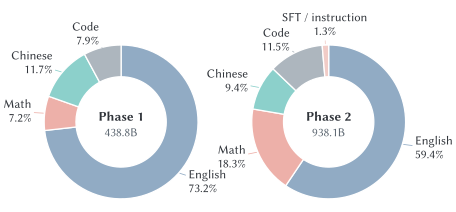
These proxy experiments reveal differences both between data sources and within a single source. They also expose trade-offs: sources that yield stronger code scores tend to yield lower scores on general benchmarks, while the trade-off between math and general performance is weaker. We therefore give math data a slightly larger share than code in Phase 2, then refine the mixture based on domain coverage and quality filtering. The small-scale results help us decide which sources and score ranges to keep, and how much weight to give each. We publish the dataset evaluation results in the report.
Beyond Cheaper Training: Studying the Full Pipeline
Hardware makes compute cheaper, and FP8 makes training faster. MuonH reduces the compute needed to reach the same validation loss, while CMA helps the model make better use of its training data. Proxy experiments guide data selection. Together, these choices form our low-cost pretraining pipeline.
Control pretraining, then compare post-training outcomes. With only released weights, researchers have little control over how a model was pretrained. Puro-2B lets them change the pretraining recipe on a smaller budget, then hold the fine-tuning and evaluation procedures fixed to measure the effect on the final model.
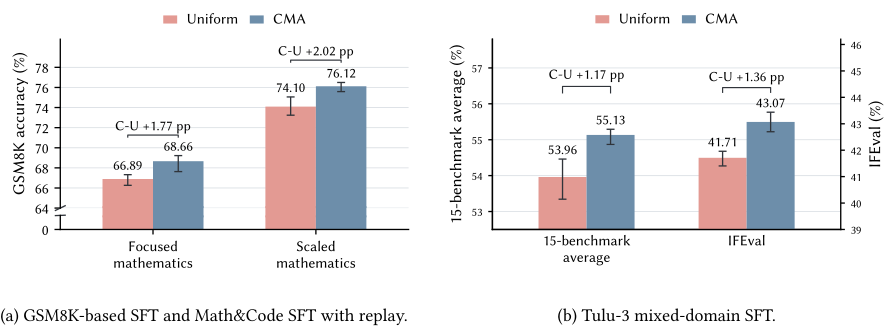
Do CMA’s gains survive fine-tuning? We fine-tune CMA- and Uniform-pretrained models using the same procedures. In two math fine-tuning experiments, starting from CMA improves GSM8K accuracy by 1.77 and 2.02 percentage points. With Tulu-3 mixed-domain fine-tuning, the 15-benchmark average improves by 1.17 percentage points and IFEval by 1.36 percentage points. All three comparisons show overall gains, suggesting that CMA’s pretraining benefits carry over under these fine-tuning setups. 9
Open Source, End to End
We release the final model, intermediate checkpoints, training data, and training framework. The model weights and project code are licensed under Apache 2.0. Source datasets remain subject to their respective upstream terms. The release includes:
-
Models and intermediate checkpoints: Puro-2B collection
-
Training data and mixtures: Puro-2B Dataset
-
Training code: Puro-Megatron
-
Data-processing code: Kaiyuan-Spark 10
These materials let other teams reproduce Puro-2B or build on it. Researchers can change the optimizer, learning-rate schedule, or data recipe, then use the same evaluation suite to compare training costs and model performance.
Cost note: All reported costs cover GPU compute for the main pretraining runs only—not the full project budget. They exclude data processing, ablation experiments, post-training, and research labor.
Acknowledgments
We thank Yikang Li, Wenjie Zhou, and Nuo Chen for reviewing this post and suggesting improvements, and Yanfu Investments for providing compute resources.
References
- OLMoE: Open Mixture-of-Experts Language Models
Niklas Muennighoff, et al. ICLR 2025
- SmolLM3: smol, multilingual, long-context reasoner
Hugging Face SmolLM team Hugging Face · 2025
- 在 RTX 5090 上启用 PCIe P2P 通信支持
Shengqi Chen Harry Chen’s Blog · 2026-03-22
- 在 RTX 5090 上启用 GPUDirect RDMA 通信支持
Shengqi Chen Harry Chen’s Blog · 2026-05-20
- DeepSeek-V3 Technical Report
DeepSeek-AI arXiv:2412.19437 · 2024
- Fantastic Pretraining Optimizers and Where to Find Them II: Hyperball Optimization
Kaiyue Wen, Xingyu Dang, Kaifeng Lyu, Tengyu Ma, Percy Liang arXiv:2606.16899 · 2026
- A Multi-Power Law for Loss Curve Prediction Across Learning Rate Schedules
Kairong Luo, Haodong Wen, Shengding Hu, Zhenbo Sun, Zhiyuan Liu, Maosong Sun, Kaifeng Lyu, Wenguang Chen ICLR 2025 arXiv ↗
- Power Scheduler: A Batch Size and Token Number Agnostic Learning Rate Scheduler
Yikang Shen, Matthew Stallone, Mayank Mishra, Gaoyuan Zhang, Shawn Tan, Aditya Prasad, Adriana Meza Soria, David D. Cox, Rameswar Panda arXiv:2408.13359 · 2024
- How Learning Rate Decay Wastes Your Best Data in Curriculum-Based LLM Pretraining
Kairong Luo, Zhenbo Sun, Haodong Wen, Xinyu Shi, Jiarui Cui, Chenyi Dang, Kaifeng Lyu, Wenguang Chen ICLR 2026 arXiv ↗
- PCMind-2.1-Kaiyuan-2B Technical Report
Kairong Luo, Zhenbo Sun, Xinyu Shi, Shengqi Chen, Bowen Yu, Yunyi Chen, Chenyi Dang, Hengtao Tao, Hui Wang, Fangming Liu, Kaifeng Lyu, Wenguang Chen arXiv:2512.07612 · 2025
- From LR to ELR: A Better Heuristic for Pretraining Dynamics
Zhanpeng Zhou, Wenjie Zhou, Yufei Gu, Juqiu Wang, Guanwei Zhang, Ruobing Xie, Xianbiao Qi, Yushi Bai, Kaifeng Lyu, Shunyu Yao Tencent Hunyuan · 2026
- Extra-Merge: Tracing the Rank-1 Subspace of Model Merging in Language Model Pre-Training
Wenjie Zhou, Bohan Wang, Hongtao Zhang, Chenxi Jia, Wei Chen, Xueqi Cheng ICML 2026 · PMLR 306:165957–165977